
Content Management Software 101: Features, Types, and How to Select the Right One
TL;DR: Content management software is the platform that enables you to create, edit, organize and publish digital content without writing code. So the main types are traditional CMS (like WordPress), headless CMS (API first, multi-channel) and open source vs. proprietary. The right choice depends on the size of your team, the technical resources you have and how you need to deliver content – on your website only or on apps, devices and channels. In this guide, we will break down each type, the CMS SEO features that matter and lay out a clear framework for choosing. All plans begin at $799/month. Markro Digital CMS Platform Management.
A small business owner wanted to add a new service on her website. She had no idea how. Her ancient developer built the site two years ago, then disappeared. Any content change (new page, updated price, fixed typo) meant finding a freelancer, explaining what was needed, and then waiting days for the $150 invoice to arrive.
She wasn’t shelling out for a website. She had to pay a tax for every sentence that she wanted printed.
Her website wasn’t the issue. There was no CMS behind it, it was a hard coded static site by a developer, no system for anyone else to manage it. Finally she switched to a proper CMS and published her next page herself, in twenty minutes, for free.
This guide is about what is content management software, the different types available in 2026 and how to choose the right one for your business and not the one that a developer picked for his convenience.
What is Content Management Software?
Content management software (CMS) is a platform that separates content from code. It allows non-technical users to create, edit, organize and publish digital content – text, images, video and product listings without touching HTML or a server. In Wikipedia’s overview of content management systems, a CMS is generally defined as consisting of a content management application (the editing interface) and a content delivery application (what actually renders on the live site).
Before content management software, every website update needed a developer. Content management software removed that dependence. Your marketing team can put out a blog post, refresh a pricing page, or swap out a homepage image without writing a single line of code.
The Importance of Content Management Software in Growing Businesses
The fastest-growing businesses for content are the ones that don’t bottleneck every update through a developer. Content management software is the infrastructure that makes that possible. It’s the difference between publishing on your own schedule and publishing on someone else’s.
How Content Management Software Works
All content management systems function on two layers that work in tandem.
CMA – Content Management Application
This is the interface. The dashboard where users log in, write, edit, upload media and hit publish. Cloudflare’s explainer on content management systems describes this as the front-end layer that non-technical users interact with directly without needing to understand the underlying code.
Content Delivery Application (CDA)
This is the back-end layer that takes the content stored in the CMA and renders it as a live webpage, app screen or API response. The CDA deals with the technical formatting so that the content is displayed correctly where it is supposed to be.
Together, these two layers allow a content team to publish independently, with the technical infrastructure running invisibly underneath.
Content Management Software Types
All content management software is not the same. It matters more what sort of brand you pick, than which brand you pick.
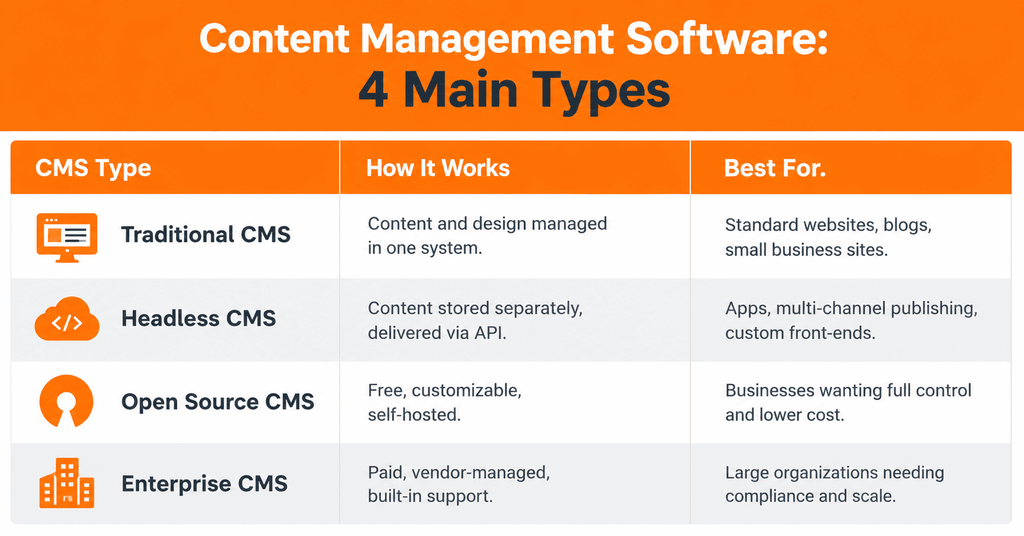
Traditional CMS
A traditional CMS ( WordPress CMS being the most widely used example ) governs both the content and its display in one connected system. Kinsta’s CMS software guide notes that this all-in-one structure is what makes traditional CMS platforms approachable for non-developers, as the editing interface and the live site are directly linked.
Headless CMS Platforms
Headless CMS solutions remove the front-end display layer entirely. Content is managed and stored in a central location, then delivered via an API to anywhere it’s needed, whether that’s a website, a mobile app or a smart display. This positions headless CMS solutions as the default for companies that publish the same content on multiple digital channels.
Open Source CMS
Open source content management systems are free to use and fully customizable, but the business hosting it is responsible for security, updates and maintenance. The trade-off is control versus convenience, lower cost and more responsibility.
Enterprise Content Management Software
Enterprise content management software provides the governance layer that large organizations need to have in place: role-based permissions, audit trails, compliance features, and dedicated vendor support. More expensive but takes away the maintenance headache of open source options.
Best CMS Platforms 2025
Here are a few of the best CMS platforms 2026 has to offer, and why they stand out:
- WordPress CMS: the most popular CMS in the world, known for its plug-in ecosystem and low barrier to entry.
- Headless solutions: Ideal for companies distributing content across apps, websites, and digital touchpoints from one central system.
- Enterprise systems: Designed for organizations with compliance, scale, or governance needs across multiple teams.
CMS coverage from Smashing Magazine often reminds us that there is not a one-size-fits-all “best” platform. It’s the one that matches the business’s technical resources and the complexity of its content, not the one with the most features on paper.
What Really Matters for Small Business CMS
Most small businesses do not require enterprise content management software. They want a small business CMS that is affordable, easy to manage, and doesn’t require a developer on retainer.
The most important easy-to-use CMS features
A user-friendly CMS should allow a non-technical team member to:
- Create a new page by opening a support ticket
- Add new content to existing content Without breaking the page layout
- Upload images without resizing or encoding
CMS Plugin Integration
By integrating plugins with your CMS you can add functionality like SEO tools, contact forms, CRM integration and e-commerce features without having to develop them yourself. One example of a CMS with a large ecosystem of plugins is WordPress CMS, which allows a small business to add functionality as it grows without having to rebuild the site from scratch.
CMS SEO Features You Can’t Ignore
CMS SEO features directly affect how well a website ranks, regardless of how good the content itself is. According to G2’s content management system category overview, buyers consistently rank built-in SEO controls among the top evaluation criteria when comparing content management software.
The bare minimum for tools to manage website content should include:
- Editable meta titles and meta descriptions for each page
- Customizable clean URL structures
- Creating XML Sitemaps
- Mobile Responsive by Default
- Quick page load speeds
- Support for schema markup
A CMS without these CMS SEO features forces a business to compensate with manual workarounds or accept a lower ceiling in search ranking than a properly configured platform would deliver.
Digital Content Management Systems Comparison Guide
This CMS comparison guide helps you compare a digital content management system against real business needs – not marketing claims.
| Factor | What to Check |
| Technical skill required | Can your team use it without a developer? |
| Cost structure | License fees, hosting, plugin costs, maintenance |
| SEO capability | Meta control, sitemaps, schema, page speed |
| Scalability | Can it handle more content, more traffic, more team members? |
| Multi-channel delivery | Does content need to reach an app or just a website? |
| Support and maintenance | Self-managed, or vendor-supported? |
How to Choose Content Management Software
Three questions govern the choice of content management software:
- Who’s publishing? For small, non-technical teams, choose an easy to use CMS such as WordPress CMS.
- Where does the content have to be? If it’s web only then a standard CMS will do. Headless CMS solutions are the better fit in terms of apps and multiple channels.
- What’s the capacity for maintenance? An open source content management system is cheaper to begin with, but requires ongoing management. Enterprise content management software does cost more, but it comes with support.
All plans at Markro Digital include CMS management: choosing the platform, setting it up, integrating plugins and ongoing maintenance are all included, so businesses don’t have to make this decision on their own. For more details, see Markro Digital Content Management System Services.
Key Insight: CMS (Content Management System)
Content management software is the infrastructure that allows a business to publish and manage digital content without the bottleneck of a developer. The main types (traditional, headless, open source, and enterprise) meet different needs depending on team size, technical resources, and where content needs to be displayed.
The right content management software is selected based on who is using it, where content needs to go and how much maintenance the business can handle, not on which platform has the most name recognition.
Markro Digital and SEO, CRM automation and full digital marketing services have content management software as a core part of every plan. See documented results in the portfolio.
Common Questions: Content Management Software (CMS)
1. What is content management software?
A platform that enables you to create, edit, organize and publish digital content without writing code. It takes care of the technical infrastructure so your team can focus on content.
2. What is the best CMS for small businesses?
WordPress is the best option for most small businesses because it’s flexible, has a large library of plugins, and its entry cost is low.
3. What is the difference between traditional and headless CMS?
A traditional CMS bundles content and display together in one system. A headless CMS separates the storage of content and serves it via APIs for multi-channel publishing.
4. What impact does CMS have on SEO?
Your content management system heavily influences page speed, code quality, mobile responsiveness, and ease of managing meta tags, sitemaps, and schema — all of which impact search rankings.
5. Can I change CMS without compromising SEO rankings?
Yes, with proper planning: proper URL redirects, preserved site structure and migrated metadata. Poor migrations can cause significant drops in rankings.
6. What features to look for in a CMS?
Ease of use, built-in SEO tools, role-based permissions, content versioning, scalability and integration support with your existing tools.
7. Is open source CMS better than paid ones?
With open source, you have more control and save on licensing costs, but you will be responsible for hosting and maintenance. Paid platforms have support but at a higher cost at scale.